Dragon STEM · Read it in the book
Play the gameYour game is still open. Switch to its tab.

Parts of a computer system
A system has parts that each do a job. Glitterdeep's signal system has spires, relays and the Crystal Core. If 1 part breaks, the parts after it may stop working right.
Word: System: parts that work together to do a job.
Read the words
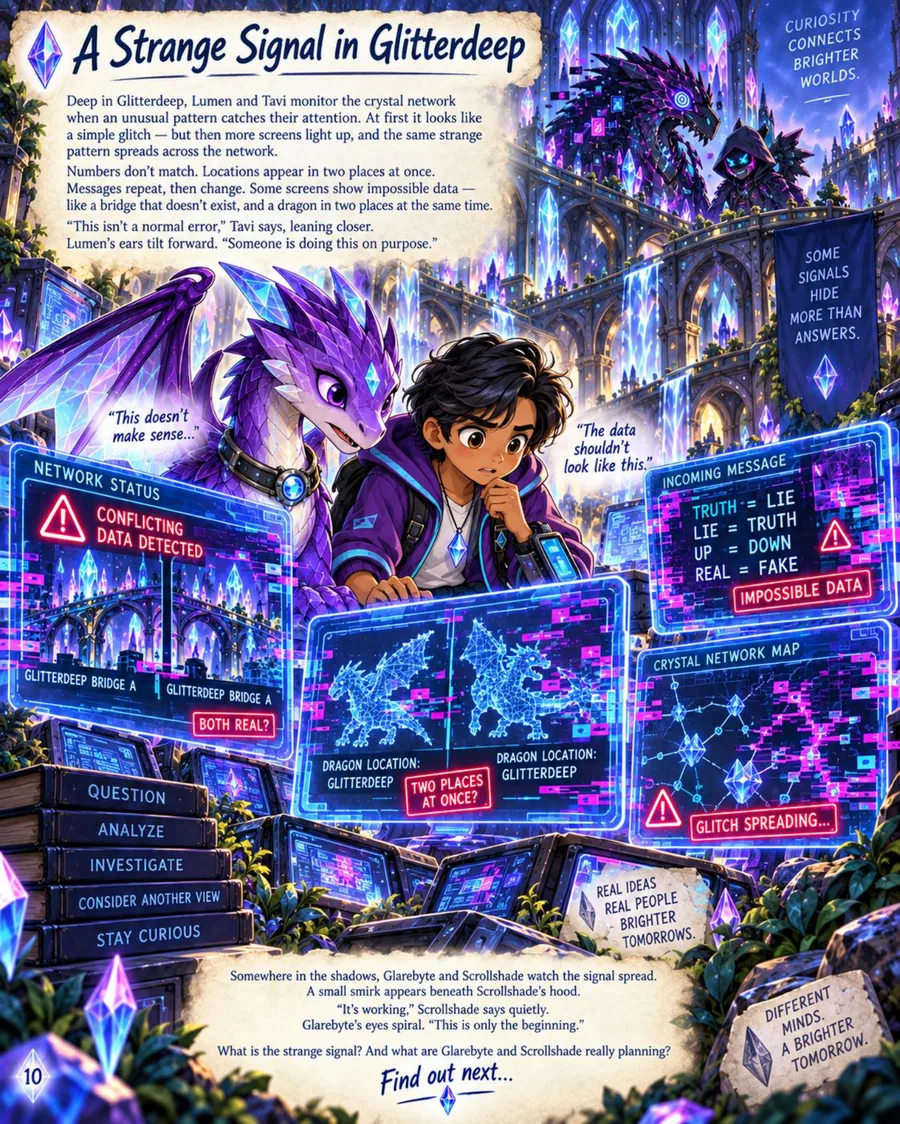
Deep in Glitterdeep, Lumen and Tavi monitor the crystal network when an unusual pattern catches their attention. At first it looks like a simple glitch — but then more screens light up, and the same strange pattern spreads across the network.
Some signals hide more than answers.
Numbers don't match. Locations appear in two places at once. Messages repeat, then change. Some screens show impossible data — like a bridge that doesn't exist, and a dragon in two places at the same time.
"This isn't a normal error," Tavi says, leaning closer.
Lumen's ears tilt forward. "Someone is doing this on purpose."
"This doesn't make sense..." "The data shouldn't look like this."
Network Status: Conflicting Data Detected. Glitterdeep Bridge A / Glitterdeep Bridge A. Both real?
Dragon Location: Glitterdeep / Dragon Location: Glitterdeep. Two places at once?
Incoming Message: TRUTH = LIE. LIE = TRUTH. UP = DOWN. REAL = FAKE. Impossible data.
Crystal Network Map: Glitch spreading...
Somewhere in the shadows, Glarebyte and Scrollshade watch the signal spread. A small smirk appears beneath Scrollshade's hood.
"It's working," Scrollshade says quietly.
Glarebyte's eyes spiral. "This is only the beginning."
What is the strange signal? And what are Glarebyte and Scrollshade really planning? Find out next...
Read the words
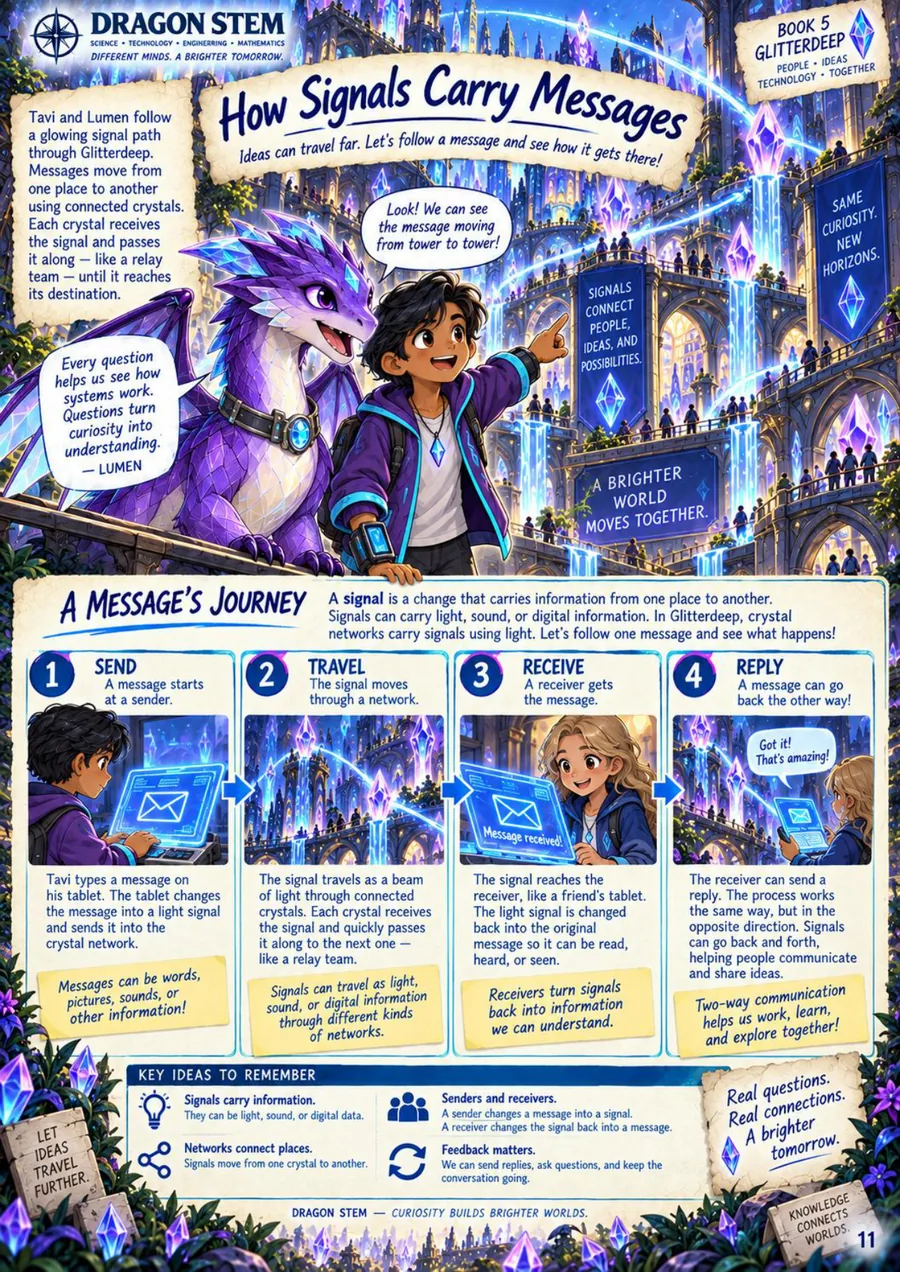
Tavi and Lumen follow a glowing signal path through Glitterdeep. Messages move from one place to another using connected crystals. Each crystal receives the signal and passes it along — like a relay team — until it reaches its destination.
Lumen: "Every question helps us see how systems work. Questions turn curiosity into understanding."
Tavi: "Look! We can see the message moving from tower to tower!"
A signal is a change that carries information from one place to another. Signals can carry light, sound, or digital information. In Glitterdeep, crystal networks carry signals using light. Let's follow one message and see what happens!
A Message's Journey — 1 Send: A message starts at a sender. Tavi types a message on his tablet. The tablet changes the message into a light signal and sends it into the crystal network. Messages can be words, pictures, sounds, or other information!
2 Travel: The signal moves through a network. The signal travels as a beam of light through connected crystals. Each crystal receives the signal and quickly passes it along to the next one — like a relay team. Signals can travel as light, sound, or digital information through different kinds of networks.
3 Receive: A receiver gets the message. The signal reaches the receiver, like a friend's tablet. The light signal is changed back into the original message so it can be read, heard, or seen. Receivers turn signals back into information we can understand.
4 Reply: A message can go back the other way! "Got it! That's amazing!" The receiver can send a reply. The process works the same way, but in the opposite direction. Signals can go back and forth, helping people communicate and share ideas. Two-way communication helps us work, learn, and explore together!
Key Ideas to Remember: Signals carry information. They can be light, sound, or digital data. Networks connect places. Signals move from one crystal to another. Senders and receivers. A sender changes a message into a signal. A receiver changes the signal back into a message. Feedback matters. We can send replies, ask questions, and keep the conversation going.
Read the words
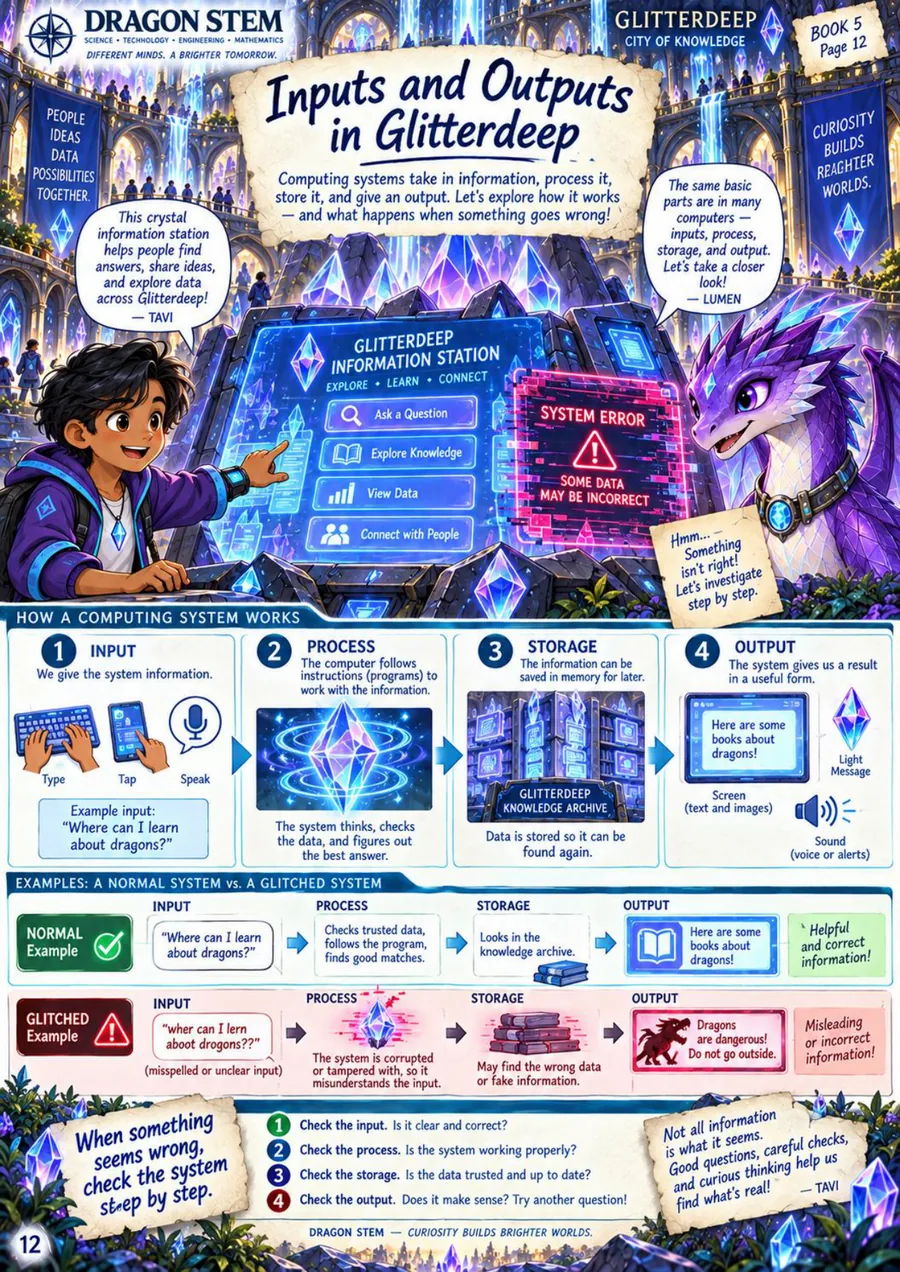
Computing systems take in information, process it, store it, and give an output. Let's explore how it works — and what happens when something goes wrong!
Tavi: "This crystal information station helps people find answers, share ideas, and explore data across Glitterdeep!"
Lumen: "The same basic parts are in many computers — inputs, process, storage, and output. Let's take a closer look!"
Glitterdeep Information Station: Explore. Learn. Connect. Ask a Question. Explore Knowledge. View Data. Connect with People. System Error: Some data may be incorrect.
"Hmm... Something isn't right! Let's investigate step by step."
How a Computing System Works — 1 Input: We give the system information. Type. Tap. Speak. Example input: "Where can I learn about dragons?"
2 Process: The computer follows instructions (programs) to work with the information. The system thinks, checks the data, and figures out the best answer.
3 Storage: The information can be saved in memory for later. Glitterdeep Knowledge Archive. Data is stored so it can be found again.
4 Output: The system gives us a result in a useful form. Screen (text and images). Light Message. Sound (voice or alerts). "Here are some books about dragons!"
Examples: A Normal System vs. a Glitched System — Normal Example: Input "Where can I learn about dragons?" Process: Checks trusted data, follows the program, finds good matches. Storage: Looks in the knowledge archive. Output: "Here are some books about dragons!" Helpful and correct information!
Glitched Example: Input "wher can I lern aboot drogons??" (misspelled or unclear input). Process: The system is corrupted or tampered with, so it misunderstands the input. Storage: May find the wrong data or fake information. Output: "Dragons are dangerous! Do not go outside." Misleading or incorrect information!
When something seems wrong, check the system step by step. 1 Check the input. Is it clear and correct? 2 Check the process. Is the system working properly? 3 Check the storage. Is the data trusted and up to date? 4 Check the output. Does it make sense? Try another question!
Tavi: "Not all information is what it seems. Good questions, careful checks, and curious thinking help us find what's real!"
Read the words
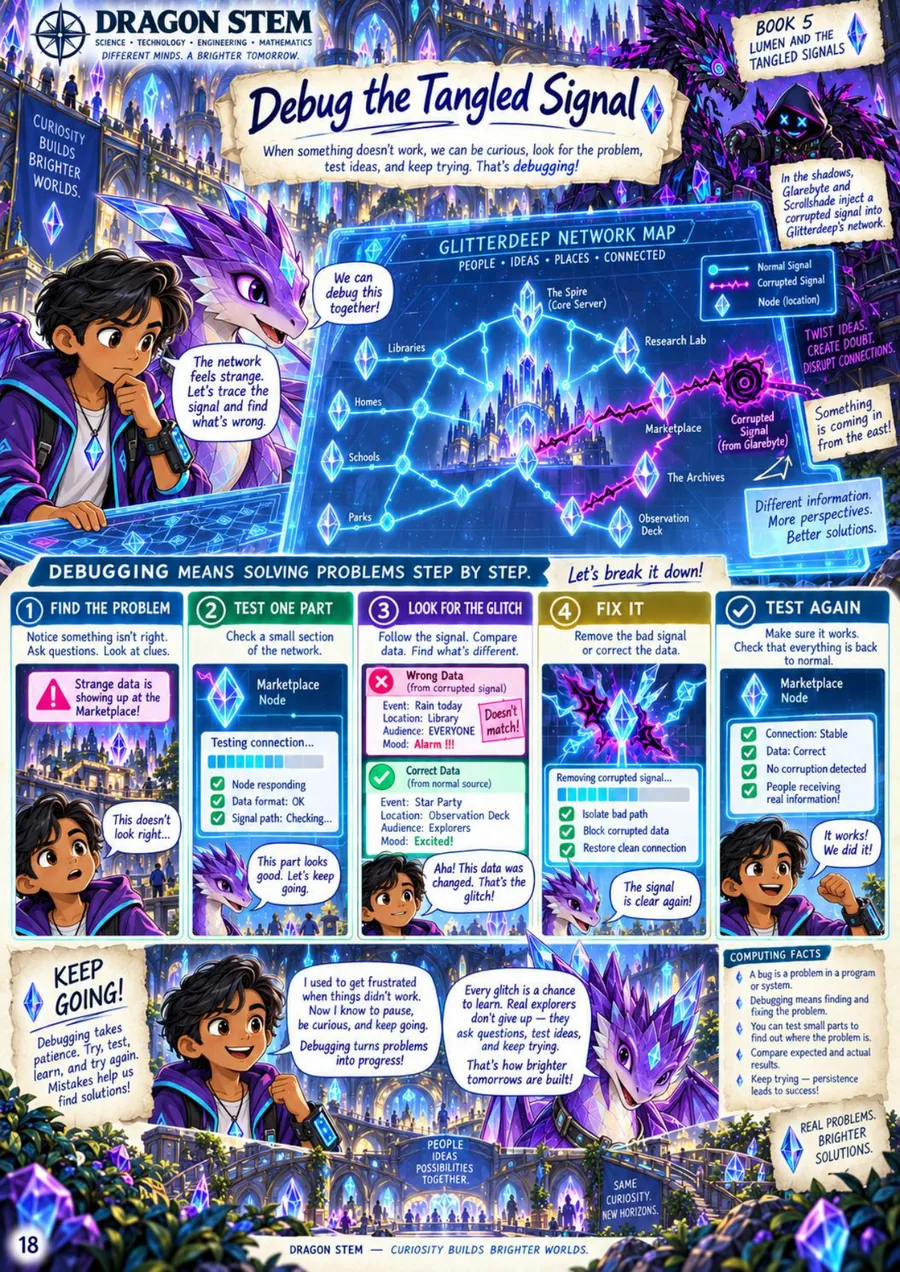
When something doesn't work, we can be curious, look for the problem, test ideas, and keep trying. That's debugging!
"We can debug this together!"
"The network feels strange. Let's trace the signal and find what's wrong."
Glitterdeep Network Map: People. Ideas. Places. Connected. The Spire (Core Server). Libraries. Research Lab. Homes. Marketplace. Corrupted Signal (from Glarebyte). Schools. The Archives. Parks. Observation Deck.
In the shadows, Glarebyte and Scrollshade inject a corrupted signal into Glitterdeep's network. Twist ideas. Create doubt. Disrupt connections. Something is coming in from the east!
Different information. More perspectives. Better solutions.
Debugging means solving problems step by step. Let's break it down!
1 Find the Problem: Notice something isn't right. Ask questions. Look at clues. Strange data is showing up at the Marketplace! "This doesn't look right..."
2 Test One Part: Check a small section of the network. Marketplace Node — Testing connection... Node responding. Data format: OK. Signal path: Checking... "This part looks good. Let's keep going."
3 Look for the Glitch: Follow the signal. Compare data. Find what's different. Wrong Data (from corrupted signal): Event: Rain today. Location: Library. Audience: EVERYONE. Mood: Alarm!!! Doesn't match! Correct Data (from normal source): Event: Star Party. Location: Observation Deck. Audience: Explorers. Mood: Excited! "Aha! This data was changed. That's the glitch!"
4 Fix It: Remove the bad signal or correct the data. Removing corrupted signal... Isolate bad path. Block corrupted data. Restore clean connection. "The signal is clear again!"
Test Again: Make sure it works. Check that everything is back to normal. Marketplace Node — Connection: Stable. Data: Correct. No corruption detected. People receiving real information! "It works! We did it!"
Keep Going! Debugging takes patience. Try, test, learn, and try again. Mistakes help us find solutions!
"I used to get frustrated when things didn't work. Now I know to pause, be curious, and keep going. Debugging turns problems into progress!"
"Every glitch is a chance to learn. Real explorers don't give up — they ask questions, test ideas, and keep trying. That's how brighter tomorrows are built!"
Computing Facts: A bug is a problem in a program or system. Debugging means finding and fixing the problem. You can test small parts to find out where the problem is. Compare expected and actual results. Keep trying — persistence leads to success!
- Look at a flashlight, a fan or a toy with buttons.
- Name 3 parts it has.
- Guess what job each part does.
- Take the batteries out. Which parts stop working?
You need: a battery-powered flashlight, fan or toy.
Ask a grown-up first. Use AA or AAA batteries, never tiny round ones. Put the batteries back when done.
Can you remember? A bike has wheels, a chain and pedals. Which part makes the wheels turn?
The pedals and chain. They turn, and the wheels follow.
For grown-ups
Learning goal: I can sort the parts of a computing system and test a network one node at a time to find where a problem starts.
Grade 3-5.
| Code | Standard |
|---|---|
| CSTA 1B-AP-15 | Test and debug (identify and fix errors) a program or algorithm to ensure it runs as intended. |
| CSTA 1B-CS-03 | Determine potential solutions to solve simple hardware and software problems using common troubleshooting strategies. |
| CSTA 1B-CS-02 | Model how computer hardware and software work together as a system to accomplish tasks. |
Talk about it:
- What is a system in your home with input, process, storage and output?
- Why test the parts in order, instead of all at once?
About 7 minutes.
How the game teaches it: evidence first, then the rider's hints (never the answer); no stars, scores or timers.
The full teacher guide is in the book.
Only the pages from this mission are shown here. From the Dragon STEM series by Adisak Sukul.